
Published: June 14, 2026 18 min read
Replicating Claude Code Hooks in OpenCode: Formatters, LSP, and Plugins
OpenCode has no hooks system. Here's how I replicated Claude Code's auto-formatting hook - and added inline validation and end-of-turn quality gates with a custom LSP server and plugins.
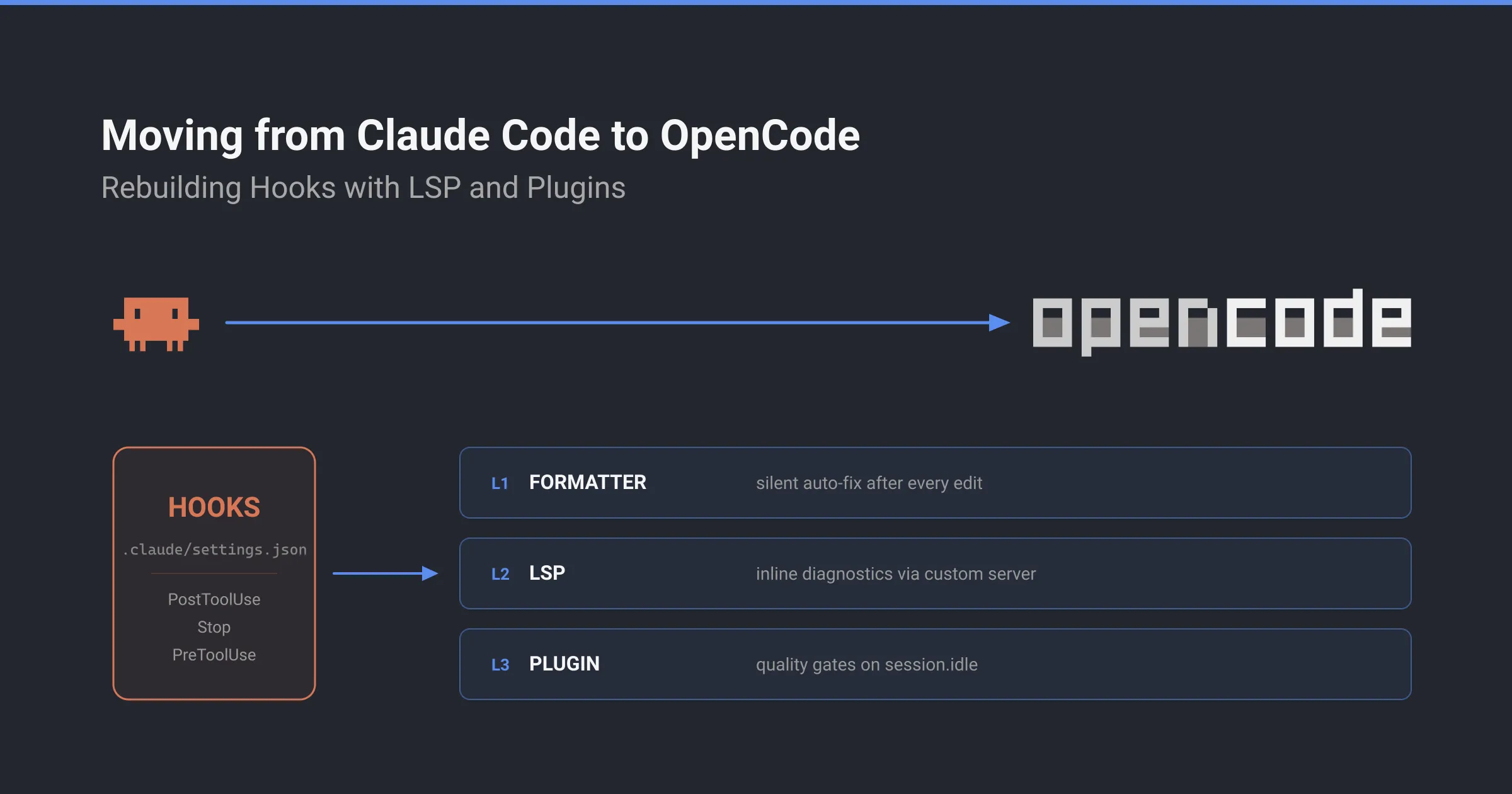
I switched from Claude Code to OpenCode. One of the first things I noticed: no hooks.
There’s no PostToolUse hook to auto-format after edits. The deterministic guardrails I had in Claude Code don’t exist here. If your PRs stayed clean because of a few lines of hooks config, that’s the first wall you’ll hit.
It took me three separate mechanisms - and one dead end I had to revisit - to cover the same ground. This is how.
I used Claude Code on a few projects - .NET backends, this blog. The hooks system was one of the things I liked most. A few lines of JSON and the agent gets deterministic guardrails.
One use case: auto-formatting after edits:
{ "hooks": { "PostToolUse": [ { "matcher": "Edit|Write", "hooks": [ { "type": "command", "command": "jq -r '.tool_input.file_path' | xargs npx prettier --write" } ] } ] }}The PostToolUse hook runs prettier --write after every file edit. The principle is simple: deterministic rules the LLM doesn’t have to remember.
Then I switched to OpenCode. No hooks system. The closest thing is a formatter config, and it works differently.
The feedback loop I had in Claude Code
Claude Code hooks are shell commands that run at specific lifecycle points. PostToolUse runs after tool calls. You can match on tool names (Edit|Write), filter by file patterns with the if field (Edit(*.ts)).
Across my projects, I used one hook for one purpose:
PostToolUseonEdit|Write- auto-fix after edits.dotnet formaton .NET projects,prettier --writeon frontend projects.
Even a single PostToolUse hook was enough to create a deterministic feedback loop. The agent edits a file, a script runs, the agent sees the result. The LLM doesn’t have to remember anything.
Without this hook, CI kept failing on PRs. Formatting violations, lint errors - things that should have been caught locally before the push. I’d fix them manually, push again, wait for CI. Every single time.
OpenCode’s formatter config: close, but not hooks
OpenCode doesn’t have a hooks system. The closest thing is a formatter section in opencode.jsonc. When the agent writes or edits a file, OpenCode checks the file extension against registered formatters and runs the matching ones.
The official docs describe this as happening “in the background.” The config supports custom commands, extension filtering, and a $FILE placeholder:
{ "formatter": { "dotnet-format": { "command": ["scripts/dotnet-format.sh", "$FILE"], "extensions": [".cs", ".vb"], }, "prettier": { "command": ["npx", "prettier", "--write", "$FILE"], "extensions": [".js", ".ts", ".css", ".md"], }, },}Any CLI tool that takes a file path and exits 0 or 1 works. dotnet format, prettier - whatever your stack needs.
Designed for code formatting. But any script that takes a file path and exits 0 or 1 works as a “formatter.” So I started registering my validation scripts there.
Replacing hooks with formatters: the partial win
On this project (a static blog), I registered three formatters:
"formatter": { "prettier": { "command": ["npx", "prettier", "--write", "$FILE"], "extensions": [".js", ".jsx", ".ts", ".tsx", ".astro", ".css", ".json", ".jsonc", ".md", ".mdx", ".yml", ".yaml"] }, "em-dash": { "command": ["node", "scripts/lint-em-dashes.mjs", "$FILE"], "extensions": [".md", ".mdx"] }, "social-length": { "command": ["node", "scripts/lint-social-length.mjs", "$FILE"], "extensions": [".md", ".mdx"] }}Prettier formats code. The em-dash script replaces Unicode em dashes with regular hyphens (yes, I use AI to help me write the blog posts!). The social-length script checks whether Twitter and LinkedIn post variants stay within character limits.
The auto-fix formatters worked. Prettier and the em-dash fixer both modify the file in place, so the agent works with the corrected version from that point on. Formatting issues stopped reaching CI.
This replaced the auto-fix half of my Claude Code hooks.
Where formatters can’t replace hooks: validation feedback
The social-length script is a validation-only script. It reads the file, checks a condition, exits with code 0 or 1. It doesn’t modify anything. On other projects, the same category covers things like API schema validators, architecture dependency checks, or test coverage gates - anything that needs to tell the agent “this file has a problem” without fixing it automatically.
This script ran after every edit, just like the auto-fix ones. But the same validation issues kept showing up in my PRs. Social posts over the character limit. On my .NET projects, the equivalent was failing tests and formatting violations. The script was catching the problems. The agent kept making the same mistakes.
I tested this directly. I registered a formatter that always exits with code 1, then asked the agent to edit a file. The agent wrote the file, the formatter ran and failed, and the agent moved on to the next task. The agent never noticed.
The formatter ran and failed with exit code 1, but none of that output reached the agent.
Why: a look at OpenCode’s source code
The answer is in OpenCode’s formatter runner at format/index.ts. Every formatter runs as a child process with stdout and stderr set to "ignore":
const result = yield * appProcess .run( ChildProcess.make(replaced[0]!, replaced.slice(1), { cwd: dir, env: item.environment, extendEnv: true, stdin: "ignore", stdout: "ignore", stderr: "ignore", }), ) .pipe( Effect.catch((error) => Effect.logError("failed to format file", { error: "spawn failed", command: cmd, ...item.environment, file: filepath, cause: errorMessage(error.cause ?? error), }).pipe(Effect.as(undefined)), ), );if (result && result.exitCode !== 0) { yield * Effect.logError("failed", { command: cmd, ...item.environment, });}The exit code is checked but only for internal logging. It is never surfaced to the agent. Validation-only scripts that exit 0 or 1 are completely invisible.
Auto-fix scripts work because they modify the file in place. Validation-only scripts don’t change anything, so they have zero effect.
The dead ends: plugins and custom tools
Before finding the real solution, I checked the other extension points. None of them replicate what Claude Code hooks do for inline feedback.
Plugins (docs) can hook into tool.execute.before and tool.execute.after. The before hook can modify tool arguments. But neither hook can modify the text the agent sees in a tool result. There’s no API to inject messages into the active conversation. Event listeners like file.edited are fire-and-forget with no return channel.
Custom tools (docs) can return arbitrary text to the agent’s context, but only when explicitly called. They’re not triggered automatically after file edits. The built-in Bash tool already handles pnpm run quality and returns the full output, so a custom tool would be redundant.
What I needed was specific: something that runs automatically after every edit and surfaces errors inline in the tool result. Like a Claude Code PostToolUse hook, but through OpenCode’s architecture.
I dismissed plugins too early. They can’t do inline feedback after edits - that part is still true. But session.idle, the event that fires when the agent finishes responding, turns out to be the right hook point for end-of-turn checks. That comes back later, when I fill in Layer 3.
LSP diagnostics: the only automatic feedback channel in OpenCode
I went to read OpenCode’s source code. In tool/edit.ts, there’s a code path after the file is written and formatters have run:
let output = "Edit applied successfully.";yield * lsp.touchFile(filePath, "document");const diagnostics = yield * lsp.diagnostics();const normalizedFilePath = FSUtil.normalizePath(filePath);const block = LSP.Diagnostic.report( filePath, diagnostics[normalizedFilePath] ?? [],);if (block) output += `\n\nLSP errors detected in this file, please fix:\n${block}`;After every edit, the tool notifies the LSP server, reads back diagnostics, and appends them to the output the agent sees. The LSP docs describe this as using “diagnostics as feedback for the agent.”
This is the only feedback channel built into OpenCode’s edit and write tools. It’s not a hooks system. But it does the one thing I needed my Claude Code hooks to do: surface validation errors inline, automatically, after every file edit.
The full flow inside the edit tool:
Agent edits a file → file written to disk → formatters run silently (stdout/stderr ignored) → lsp.touchFile() notifies the LSP server → lsp.diagnostics() reads back errors → errors appended to tool output → agent sees the resultFormatters run first and modify the file. Then the LSP server validates the modified version. If there are errors, the agent sees them inline and can fix them in the same turn.
The severity filter
There’s a catch. Not all diagnostics reach the agent, and the ones that do are all labeled the same way. Two functions in lsp/diagnostic.ts control this.
The filter discards everything except severity 1:
export function report(file: string, issues: LSPClient.Diagnostic[]) { const errors = issues.filter((item) => item.severity === 1); if (errors.length === 0) return ""; const limited = errors.slice(0, MAX_PER_FILE); const more = errors.length - MAX_PER_FILE; const suffix = more > 0 ? `\n... and ${more} more` : ""; return `<diagnostics file="${file}">\n${limited.map(pretty).join("\n")}${suffix}\n</diagnostics>`;}The renderer maps severities to labels:
const severityMap = { 1: "ERROR", 2: "WARN", 3: "INFO", 4: "HINT",};The WARN, INFO, and HINT entries exist in the renderer but are never reached. The filter above only passes severity 1 through, so every diagnostic the agent sees is labeled ERROR. A social post over the character limit isn’t a code-breaking error - it’s advisory. But set severity: 2 to reflect that, and OpenCode drops it before the renderer runs. The agent never sees it.
Publish everything as severity: 1. That’s the only way through. The ERROR label is hardcoded in OpenCode’s renderer and can’t be overridden from your server, so the tone comes through in the message text instead - advisory phrasing that the agent reads and acts on:
severity: 1, // MUST be 1 - severity 2+ is silently droppedmessage: "Twitter post exceeds 280 character limit (342 chars, over by 62)",The agent sees ERROR [1:1] Twitter post exceeds 280 character limit... and fixes it. The ERROR prefix is noise imposed by the renderer. The message is what matters.
Whether this is intentional - keeping agent output focused on errors, avoiding lower-severity noise - or something that could be relaxed, the practical consequence is the same: severity 1 for everything is the only option that currently reaches the agent.
Building the hooks replacement: a custom LSP server
The LSP docs show how to register a custom server. Here’s the config for this project’s content validator:
{ "lsp": { "blog-lint": { "command": ["node", "scripts/blog-lint-lsp.mjs"], "extensions": [".md", ".mdx"], }, },}The extensions field accepts any file extension. On a .NET project, you’d register a server for .cs files. On an Astro project, .astro. The server itself is a Node.js script that communicates over stdio using the Language Server Protocol. No external dependencies. The protocol uses JSON-RPC messages with a Content-Length header for framing.
The server handles seven LSP methods. Here’s the full structure:
import { readFileSync, existsSync } from "node:fs";
const openedFiles = new Map();let buf = Buffer.alloc(0);
27 collapsed lines
function tryReadMessage() { while (true) { const str = buf.toString("utf-8"); const headerEnd = str.indexOf("\r\n\r\n"); if (headerEnd === -1) return null;
const header = str.slice(0, headerEnd); const match = header.match(/Content-Length:\s*(\d+)/i); if (!match) { buf = buf.slice(headerEnd + 4); continue; }
const len = parseInt(match[1], 10); const bodyStart = headerEnd + 4; if (buf.length < bodyStart + len) return null;
const body = buf.toString("utf-8", bodyStart, bodyStart + len); buf = buf.slice(bodyStart + len);
try { return JSON.parse(body); } catch { continue; } }}
function send(msg) { const body = JSON.stringify(msg); const header = `Content-Length: ${Buffer.byteLength(body)}\r\n\r\n`; process.stdout.write(header + body);}
function publishDiagnostics(uri, diagnostics) { send({ jsonrpc: "2.0", method: "textDocument/publishDiagnostics", params: { uri, diagnostics }, });}
function validate(filePath) { if (!existsSync(filePath)) return []; const diagnostics = []; const content = readFileSync(filePath, "utf-8");
const limits = { twitter: 280, linkedin: 2080 }; const fm = content.match(/^---\n([\s\S]*?)\n---/); if (fm) { const platform = fm[1].match(/platform:\s*(\w+)/)?.[1]; const limit = limits[platform]; if (limit) { const body = content.slice(fm[0].length).trim(); if (body.length > limit) { diagnostics.push({ range: { start: { line: 0, character: 0 }, end: { line: 0, character: 1 }, }, severity: 1, source: "blog-lint", message: `${platform} post exceeds ${limit} char limit (${body.length} chars)`, }); } } } return diagnostics;}
function handleMessage(msg) { if (!msg) return; const { id, method, params } = msg;
switch (method) { case "initialize": send({ jsonrpc: "2.0", id, result: { capabilities: { textDocumentSync: { openClose: true, change: 1 }, }, }, }); break;
case "initialized": break;
case "textDocument/didOpen": { const uri = params.textDocument.uri; const filePath = uri.replace("file://", ""); openedFiles.set(uri, filePath); publishDiagnostics(uri, validate(filePath)); break; }
case "textDocument/didChange": { const uri = params.textDocument.uri; const filePath = openedFiles.get(uri) || uri.replace("file://", ""); publishDiagnostics(uri, validate(filePath)); break; }
case "textDocument/didClose": openedFiles.delete(params.textDocument.uri); break;
case "shutdown": send({ jsonrpc: "2.0", id, result: null }); break;17 collapsed lines
case "exit": process.exit(0); // falls through default: if (id !== undefined) { send({ jsonrpc: "2.0", id, result: null }); } }}
let processing = false;async function processBuffer() { if (processing) return; processing = true; while (true) { const msg = tryReadMessage(); if (!msg) break; handleMessage(msg); await new Promise((r) => setImmediate(r)); } processing = false;}
process.stdin.on("data", (chunk) => { buf = Buffer.concat([buf, chunk]); processBuffer();});OpenCode sends textDocument/didOpen when the agent opens a file and textDocument/didChange when it edits one. Your server validates and publishes diagnostics back. Each diagnostic needs four fields:
diagnostics.push({ range: { start: { line: 5, character: 10 }, end: { line: 5, character: 25 }, }, severity: 1, // MUST be 1 - other severities are filtered out source: "blog-lint", message: "Twitter post exceeds 280 character limit (342 chars)",});Lines and characters are 0-indexed. The message is what the agent reads and acts on. On this blog project, my server validates social post character limits. The same structure works for any validation - architecture rules, schema checks, pattern matching.
A copyable LSP server template is at example-validator.mjs and a complete opencode.jsonc showing both layers is at example-opencode.jsonc.
The full picture: three layers that replaced one hooks config
With the LSP server running, I had three validation mechanisms at different stages. Together they cover what my Claude Code hooks config used to do.
Agent edits a file ↓ Layer 1: Formatters auto-fix silently ├── dotnet format / prettier (code formatting) └── custom auto-fix scripts (style, typography, etc.) ↓ Layer 2: LSP server runs inline validation ├── lsp.touchFile() triggers re-validation ├── social post character limits / content rules └── architecture rules / schema validation / etc. ↓ Agent sees <diagnostics> inline (if errors found) and fixes them in the same turn ↓ Agent finishes responding → session.idle fires ↓ Layer 3: Plugin runs quality gates automatically ├── linters + type checkers + test suites ├── on failure, injects output back via promptAsync └── agent fixes and the cycle repeats (max 3 retries) ↓ All gates pass, or retry cap hit → CI catches the rest at PR| Layer 1: Formatter | Layer 2: LSP | Layer 3: Plugin | |
|---|---|---|---|
| When it runs | Automatically after every edit/write | Automatically after every edit/write | Automatically on session.idle; CI gates at PR |
| Scope | Single file | Single file | Entire project |
| Agent sees output? | No, output is discarded | Yes, inline <diagnostics> | Yes, injected back via promptAsync on failure |
| What it’s for | Silently fix style issues | Flag errors the agent must fix | Project-wide quality gates |
Layer 1 handles things the agent shouldn’t think about: formatting, style. Layer 2 catches things the agent needs to know about: validation rules, content policies, architecture constraints. Layer 3 runs comprehensive checks across the whole project - and this was the last piece to automate.
The interaction matters. Formatters run first and modify the file. Then the LSP server validates the modified version. If the LSP finds errors, the agent sees them and fixes them in the same turn. When the turn ends, the session.idle plugin runs the full quality suite and injects any failures back. Issues that used to reach PRs are now caught after the edit - and after the turn.
The same architecture works across stacks. On a .NET project, Layer 1 runs dotnet format, Layer 2 validates architecture rules via a custom LSP server, Layer 3 runs dotnet test. The layers stay the same; the tools change.
Claude Code hooks vs OpenCode setup: the comparison
In Claude Code, one hook handled auto-fix after edits. A few lines of JSON, and formatting was deterministic.
In OpenCode, I needed three mechanisms to cover the same ground and go beyond it. Formatters for silent auto-fix. LSP diagnostics for inline validation. An idle plugin for end-of-turn quality gates. Each one covers something the others can’t.
The trade-off is more moving parts, but the LSP server approach lets me validate anything: content rules, character limits, forbidden patterns, architecture constraints, API schema compliance - whatever the project needs. And because it speaks the LSP protocol, it integrates cleanly into OpenCode’s existing tool flow. The agent doesn’t need special instructions. It just sees diagnostics in the edit output and reacts.
The idle plugin works differently from a blocking hook. session.idle fires after the agent is already idle, then injects a new prompt via promptAsync to start a follow-up turn. After the retry cap (3 attempts), the plugin stops injecting and the agent walks away thinking it’s done. Whatever slipped through lands at the CI gate. In practice, the combination of inline LSP feedback plus the idle plugin catches most issues before the agent finishes.
What I learned
Formatters are for silent auto-fix, not validation. This is by design. Formatting feedback is noise the agent doesn’t need. But it means you can’t repurpose formatters for validation, no matter how tempting the config syntax looks. The formatter config looks like it should work for validation. It doesn’t.
Custom LSP servers are lightweight. A Node.js script with zero dependencies speaking JSON-RPC over stdio. No build step, no framework. Seven methods and you’re done. The Language Server Protocol specification is well-documented. The same pattern works for any validation: C# architecture rules, content policies, API schema compliance - whatever the project needs.
The LSP docs note that LSP can help the agent find and fix issues, but is not always a net positive. Language servers can get out of sync, use significant memory, and slow down workflows. A custom validation server avoids most of these: it validates on demand, uses minimal memory, and runs in milliseconds. It’s not a full language server. It’s a validation script that happens to speak the LSP protocol.
The severity field doesn’t work as you’d expect. The LSP protocol defines four severity levels. OpenCode’s filter accepts only one. Everything must be severity: 1 or the diagnostic is dropped. The WARN, INFO, and HINT labels in the renderer are never reached. The message text is your only lever for tone.
Reading source code is the fastest way to discover extension points. The formatter docs don’t mention that stdout is discarded. The LSP docs don’t mention that diagnostics are the only feedback channel in edit/write tools, or that the severity filter drops everything except errors. I found all three by reading format/index.ts, edit.ts, and lsp/diagnostic.ts.
The idle plugin can’t block the agent. session.idle fires whenever the session transitions to idle - including when the user interrupts with Esc, not just when the agent finishes naturally. You can inject a follow-up turn with promptAsync, but you can’t prevent the agent from stopping. After the retry cap, the plugin gives up. CI is the backstop that catches what the agent session couldn’t self-correct. But in practice, inline LSP diagnostics catch most issues in the same turn, long before the idle gate runs.
session.idle fires more often than you’d expect. Any transition to idle triggers it: natural completion, Esc interruption, even rapid cycles where the agent’s response to an injected prompt is very short. Without a guard, the retry counter can burn through all 3 attempts in seconds without the agent ever processing an injection. The fix: after each injection, start a 15-second cooldown. All idle events within that window are ignored, giving the agent time to receive and process the failure. This absorbs any number of Esc-triggered or fast-cycle idle events, not just one.
OpenCode has no hooks system. What it has is three mechanisms - formatters, LSP diagnostics, an idle plugin - that together cover the same ground. If you want to try the LSP approach, the server template and config example are ready to copy. Drop in your own validation rules, register the server, and the agent gets inline feedback on every edit.